
Add DTMs
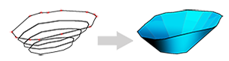
To access this screen:
-
Reserves ribbon >> Phases >> Add DTMs.
Studio OP uses phase DTMs when you create mining reserve solids. A phase DTM is an open wireframe surface that represents an individual phase within a pit, for example a pushback or the pit state at a time period.
Use this screen to define the geometry of phases created in the Define Phases setup task on the Setup ribbon.
Where phases have been defined, they appear in a table and you can associate them with existing string data or DTM data.
If you supply string data, you can use this task to generate the DTM that represents the phase shell. You then turn this shell into a phase solid using later tasks in the managed Reserves workflow.
You cannot add new phases here. Use the Define Phases task to add phases to your project.
Phase DTMs are used with pit surface topography to generate Phase Solids.
Activity steps:
-
Display the Add DTMs task.
-
Select the Pit you want to work with.
-
The phases for the pit are listed in the table below. to override automatic naming for a phase, enter a Name.
-
To define phase outlines from string data, in the String column click Browse and select a string file.
-
For each phase, you can choose a string file generated during the Define Benches task, or a detailed pit design created in your product or elsewhere.
-
The browse button displays the Phase String Chooser screen, where you can select a string file from disk or from a scenario.
-
Check or uncheck the check box in the String column to show or hide the string data in the 3D window.
-
-
To load an existing DTM, in the DTM column click Browse and select a wireframe surface.
-
The browse button displays the Phase DTM Chooser screen, where you can select a DTM from disk or from a scenario.
-
Check or uncheck the check box in the DTM column to show or hide the wireframe data in the 3D window.
-
-
To create DTMs from the selected string files, click Create.
-
To create or recreate DTMs for all phases that have string data, click Create All.
-
Save your project.
Related topics and activities:
